
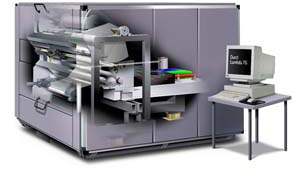
What are Lambda Digital Prints?
The Durst Lambda 130 is the most advanced system producing digital prints available on the market today. The system prints digital files directly to photographic materials using a system of red, green and blue (RGB) lasers. Maximum single sheet output can be up to 49.5″ x 240″. For digital prints requiring larger sizes, images can be automatically tiled to produce the desired size.
How Do Lambda’s Digital Photos Differ from Inkjet or Electrostatic Printing Systems?
The Lambda directly exposes the light sensitive emulsions of photographic papers and backlit film (Duratrans), creating a continuous-tone photographic image. This eliminates inks and dot patterns.
Are Lambda Digital Prints of Higher Quality Than Prints Made from Film Output or Original Negatives?
In most cases, yes. Lambda’s digital photos are imaged directly from your digital file eliminating loss of image quality due to the second generation transparency or negative. Printing from digital scans of your original film eliminates several problems common to traditional enlarger printing, i.e. Newton rings, dust and color crossover. Moreover, by eliminating visible dot screen and grain patterns, the system offers pinpoint color accuracy in tandem with razor sharp image detail from corner to corner.
Do Lambda Digital Prints Allow Greater Manipulation and Control of Color than Conventional Photographic Printing?
Yes. Digital imaging programs allow you to manipulate specific areas of color. For example, skin tones can be made warmer without affecting the sky blue background. The Lambda maintains the integrity of subtle changes in color, saturation and contrast as it prints to photographic materials. In addition, because laser technology delivers a purer light to the silver layers of the photographic emulsions, colors are cleaner and richer.
What About Digital Printing to Backlit Film? Will the image maintain its maximum luminosity even if the image is made up of highly saturated colors?
Absolutely. The Lambda exposes the light sensitive emulsion of Duratrans or Duraclear using light generated by its RGB laser system. This photographic process brings out the color inherent in the emulsion. Thus, the Duratrans or Duraclear retains all its translucence. There is no buildup of opaque dyes or tightly configured dot patterns one would encounter using other digital printing processes.
Do I Need High Resolution Drum Scans to Guarantee a Sharp Image?
No. Unlike film recorders which require high resolution drum scans, the Lambda’s digital photos can be produced from relatively low resolution digital scans. In fact high res drum scans often have to be sized down in order to be printed on the Lambda. The Lambda has a set resolution of up to 400 ppi, so low res scans may be acceptable. It is important to remember that the Lambda is an RGB device and RGB files provide best results.
Technical Info
The Durst Lambda 130 is a large format digital printer for the direct output of digital files by laser onto photographic materials (both paper and film). Learn more…